
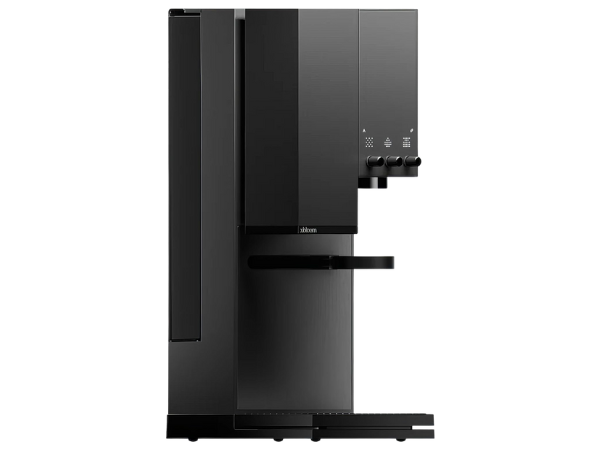
Note: Its 20‑bar pressure system ensures rich crema, while the three automation levels (Autopilot, Copilot, Freesolo) let you choose between full automation or manual control.
| Attribute | Value |
|---|---|
| Type | Smart Coffee Machine |
| Capacity | 34 oz |
| Brew Time | 3–5 minutes |
| Pressure | 20 Bar Pump Pressure |
| Automation Levels | Autopilot, Copilot, Freesolo |
The xBloom Studio Coffee Machine is a next‑generation brewer that blends automation, design, and sustainability. Built for coffee enthusiasts who want café‑quality drinks at home, it combines smart technology with tactile controls, compostable pods, and app integration.
What Is the xBloom Studio Coffee Machine?
The xBloom Studio Coffee Machine is a smart, precision‑driven brewer designed to replicate the artistry of a barista. Unlike traditional drip or pod machines, it integrates automation with manual control, allowing users to customize every step of the brewing process.
Defining traits include:
- Smart automation with three brewing modes
- Compostable xPods filled with whole beans and filters
- Integrated grinder for fresh coffee extraction
- Intuitive tactile knobs and LED matrix display
- App connectivity for recipe creation and sharing
It’s ideal for enthusiasts who want to experiment with recipes, as well as beginners who appreciate automation.
3 Levels of Automation: Autopilot, Copilot, and Freesolo
One of the standout features of the xBloom Studio is its three levels of automation, designed to suit different skill levels and preferences.
Automation modes include:
- Autopilot – Fully automated brewing; just insert an xPod and press start.
- Copilot – Semi‑automated brewing; adjust grind size, water flow, or brew strength.
- Freesolo – Manual brewing; complete control over every variable, like a professional barista.
Beginners can rely on Autopilot for consistent results, while advanced users can experiment with Freesolo to fine‑tune their coffee. Copilot bridges the gap, offering guided customization without overwhelming complexity.
Intuitive UI: Tactile Knobs and LED Matrix Display
The xBloom Studio emphasizes user experience through its intuitive interface. Instead of relying solely on digital screens, it combines tactile knobs with a modern LED matrix display.
UI highlights include:
- Tactile knobs for grind size, water flow, and brew strength
- LED matrix display for real‑time feedback and brewing visuals
- Minimalist design that reduces clutter and enhances usability
- Responsive controls that mimic professional barista tools
- Freestyle brewing options for creative experimentation
This design bridges the gap between analog and digital. The knobs provide a hands‑on feel, while the LED matrix ensures precision. Together, they create a brewing experience that feels both artistic and scientific.
Smart Brewing with the xBloom App
The xBloom app extends the machine’s functionality by allowing users to create, adjust, and share recipes. It transforms brewing into a social and customizable experience.
App features include:
- Recipe creation with adjustable grind, water flow, and brew time
- Save and share options for personalized coffee profiles
- Community integration to explore recipes from other users
- Remote control for brewing directly from your phone
- Updates and firmware improvements for evolving features
The app makes the xBloom Studio more than a standalone machine—it becomes part of a connected ecosystem. Users can experiment with recipes, save their favorites, and share them with friends or the wider coffee community.
xPods Explained: Compostable, Whole Bean, and Filter Integration
xPods are at the heart of the xBloom Studio experience. Unlike traditional plastic pods, they are compostable and filled with whole beans, ensuring freshness and sustainability.
xPod highlights include:
- Compostable materials for eco‑friendly disposal
- Whole beans for grinding and brewing on demand
- Integrated filter to simplify the process
- Curated selections from specialty roasters
- Recipe cards that guide brewing automatically
Instead of pre‑ground coffee, xPods deliver whole beans, which are freshly ground by the machine. The integrated filter reduces waste and simplifies cleanup.
How to Brew with xPods: Step‑by‑Step Process
Brewing with xPods is designed to be fast, consistent, and waste‑conscious. Each xPod contains curated whole beans and an integrated filter, paired with a recipe card that encodes the optimal parameters for that coffee.
Step‑by‑step process:
- Tap the recipe card to load brewing instructions
- Pour whole beans from the xPod into the grinder
- Position the xPod into the dock with its filter
- Select Autopilot, Copilot, or Freesolo mode
- Press start and watch the machine brew your coffee
Even beginners can enjoy café‑quality drinks without complex steps. For advanced users, the flexibility of Copilot and Freesolo adds depth to the experience.
What’s Included in the xBloom Studio Coffee Machine Box?
When you purchase the xBloom Studio Coffee Machine, you’re not just getting the brewer itself—you’re receiving a complete starter kit designed to help you begin brewing specialty coffee right away.
Included items:
- xBloom Studio Coffee Machine
- Omni Dripper 2 with Hyperflow Bottom
- 10 paper filters for manual brewing options
- xPod dock for pod integration
- Magnetic dosing cup for precise measurements
- Default recipe card + quick start guide
- Cleaning brush for maintenance
- Universal power cord for global compatibility
For new buyers, the quick start guide simplifies setup, while the dosing cup and dripper expand brewing possibilities. By offering a complete kit, xBloom ensures that the Studio is ready for experimentation from day one.
Pros and Cons of the xBloom Studio Coffee Machine
This machine is designed for enthusiasts who want café‑quality results at home, but it also introduces features that appeal to beginners. By combining automation, compostable pods, and app integration, it offers a unique balance of convenience and customization.
Pros:
- Compostable xPods with whole beans
- Three automation levels for flexibility
- Intuitive tactile knobs and LED display
- App integration for recipe sharing
- Stylish, compact design
Cons:
- Higher price compared to basic machines
- Learning curve for Freesolo mode
- Requires xPods for optimal performance
- Limited availability in some regions
Overall, the pros outweigh the cons for most users. The machine is designed for enthusiasts who value sustainability, customization, and smart technology.
Final Verdict: Is the xBloom Studio Coffee Machine Worth It in 2026?
The xBloom Studio Coffee Machine is one of the most innovative brewers of 2026. By combining automation, tactile design, compostable pods, and app integration, it delivers a unique coffee experience.
Verdict highlights:
- Best for coffee enthusiasts and eco‑conscious buyers
- Offers flexibility through three automation modes
- Delivers café‑quality drinks with minimal effort
- Provides sustainability through compostable xPods
- Justifies its premium price with innovation and design
In conclusion, the xBloom Studio is worth the investment for those who want more than just coffee—it’s about the journey of brewing.